For security and low-voltage integrators

Mark up the plan. Deliver the as‑built.

Place devices, draw coverage and cable runs, track installs, and hand over a clean as-built PDF and parts list. All from the same plan, on any device.

Free during early access

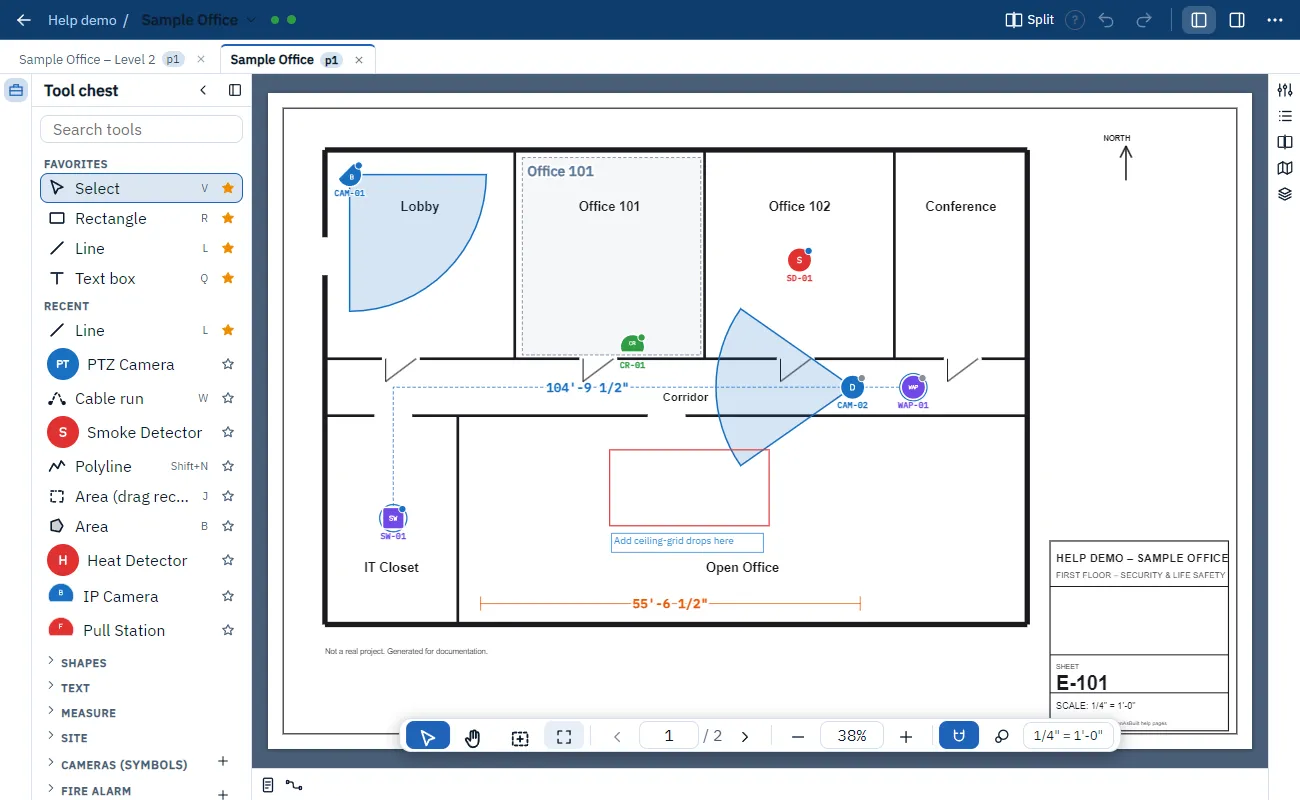
PlanAsBuilt showing a floor plan with camera coverage cones, device symbols, a cable run and a tool chest on the left.

Owners and project managers

Plan the job, watch progress, and send customers a professional as-built without the rework.

Field installers

Open the plan on your phone, tap a device, update its status and details, and scan serial numbers.

Customers

Receive a clear, stamped as-built PDF and parts list that shows exactly what was installed and where.

Mark up fast

Place devices in seconds, not minutes.

Pick a device from your catalog and click the plan. Tags number themselves, devices snap to walls, and you can keep placing without going back to the toolbar.

  • Symbols from your own device catalog
  • Automatic tags and numbering
  • Status: planned, installed, tested, punch
  • Ctrl+double-click a device to pick it up and keep placing
The tool chest next to a plan with placed cameras, a smoke detector and a card reader.

Device records

Every device carries its own information.

Each device you place is a full record, not just a symbol. Fill it in on site and it travels with the plan into your as-built.

  • Photos of the installed device
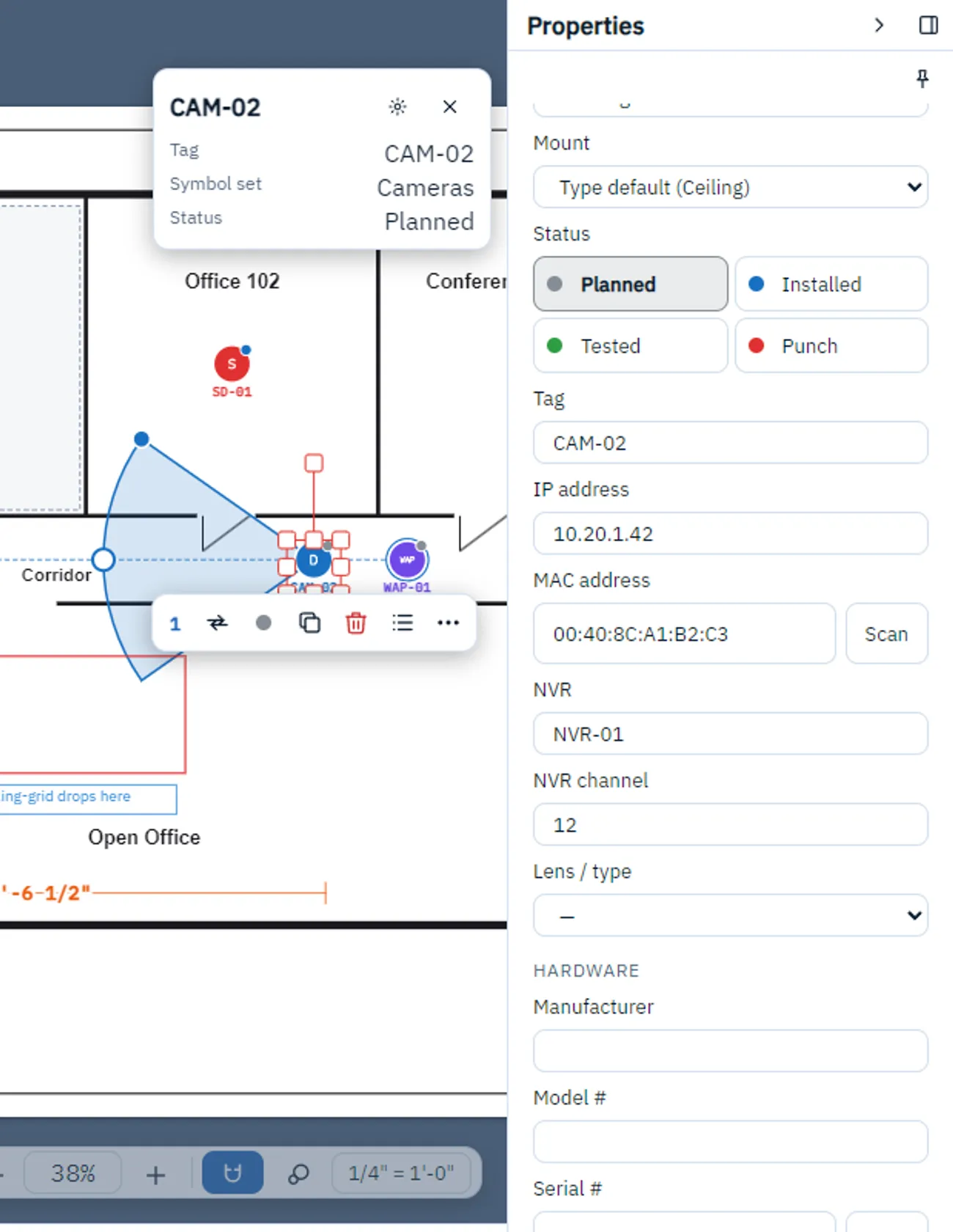
  • Serial number and MAC address, with barcode scanning from your phone camera
  • IP address, NVR and channel, firmware, notes
  • Your own custom fields per device type: alarm loop, zone, panel address, circuit, anything you track
A selected camera on the plan with its Properties: IP address, MAC address with a Scan button, NVR and NVR channel filled in.

Coverage and cable runs

See what is covered, and how much cable you need.

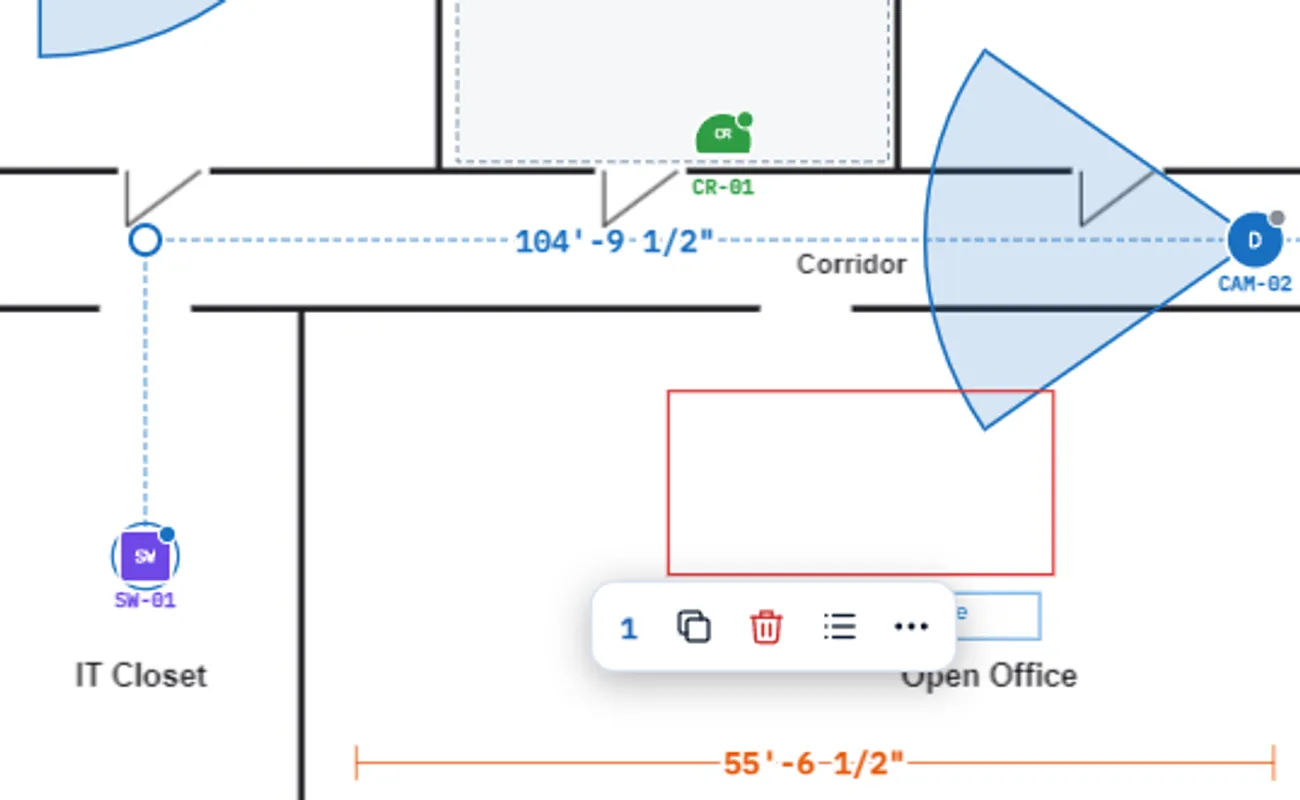
Show camera coverage as cones on the plan. Draw cable runs between devices and the lengths feed straight into your parts list.

  • Coverage cones you can resize and aim
  • Cable runs with measured lengths
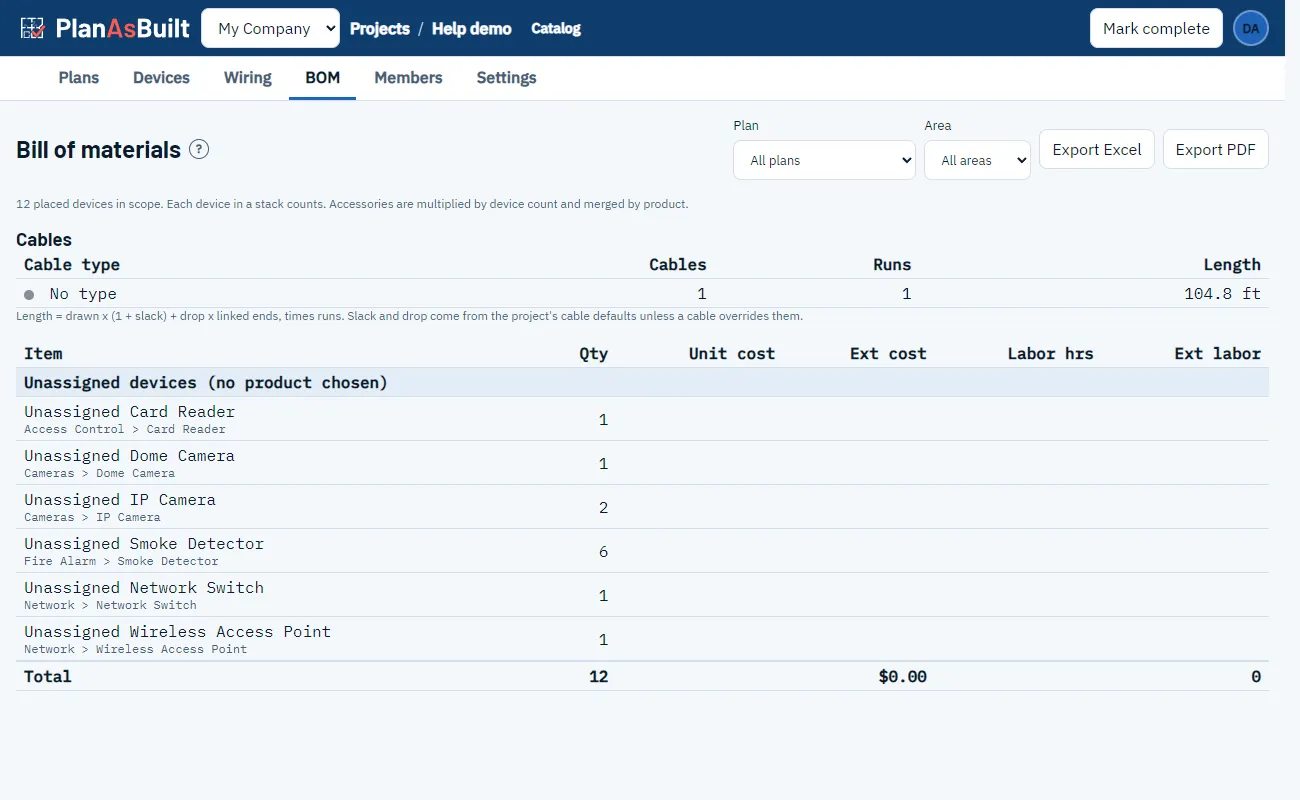
  • Lengths included in the bill of materials
A cable run drawn between a network switch and a camera on a floor plan, with its length shown.

Work together

Everyone on the same plan, live.

See where teammates are looking and what they have selected. Edits sync in real time, so the office and the field never work from different drawings.

  • Live cursors and selections
  • See which part of the plan a teammate is viewing
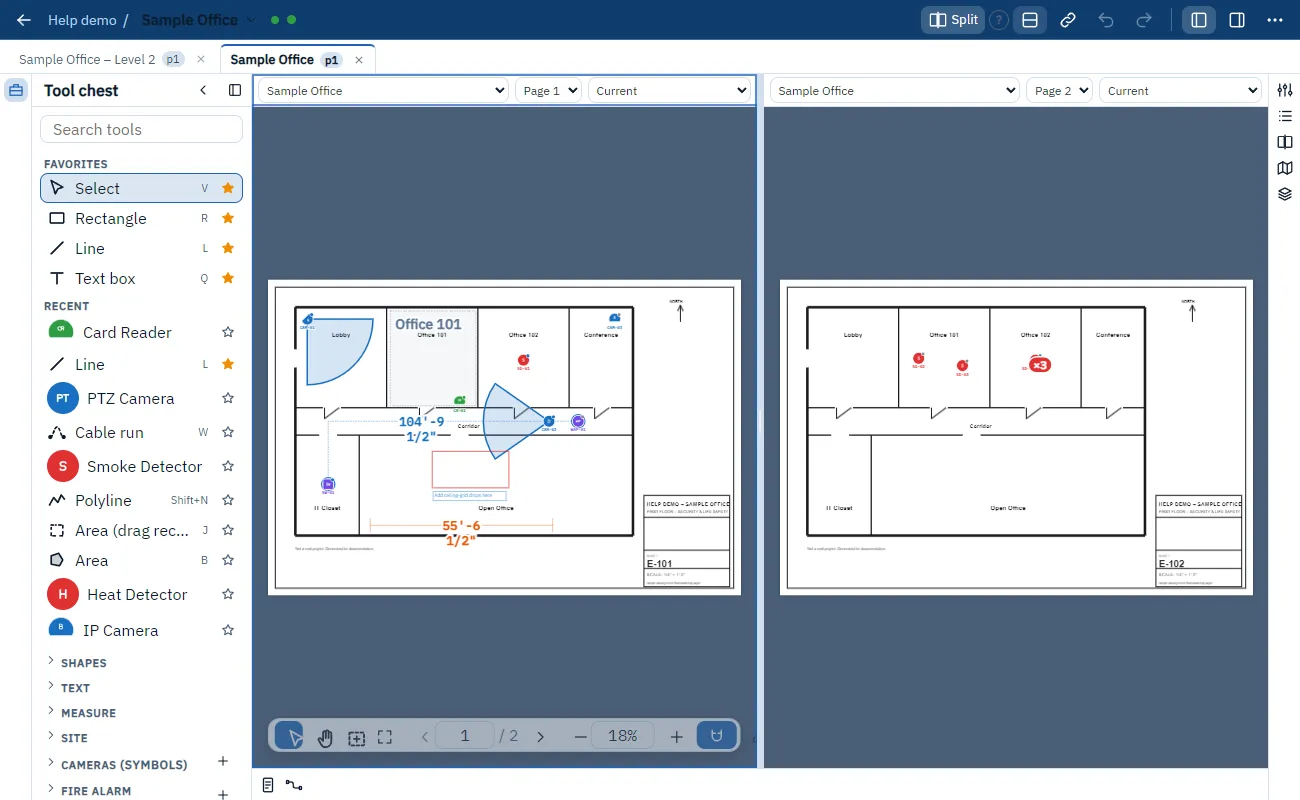
  • Split view to compare pages or areas side by side
Split view showing two pages of the same plan side by side.

Compare revisions

See exactly what changed, clouded for you.

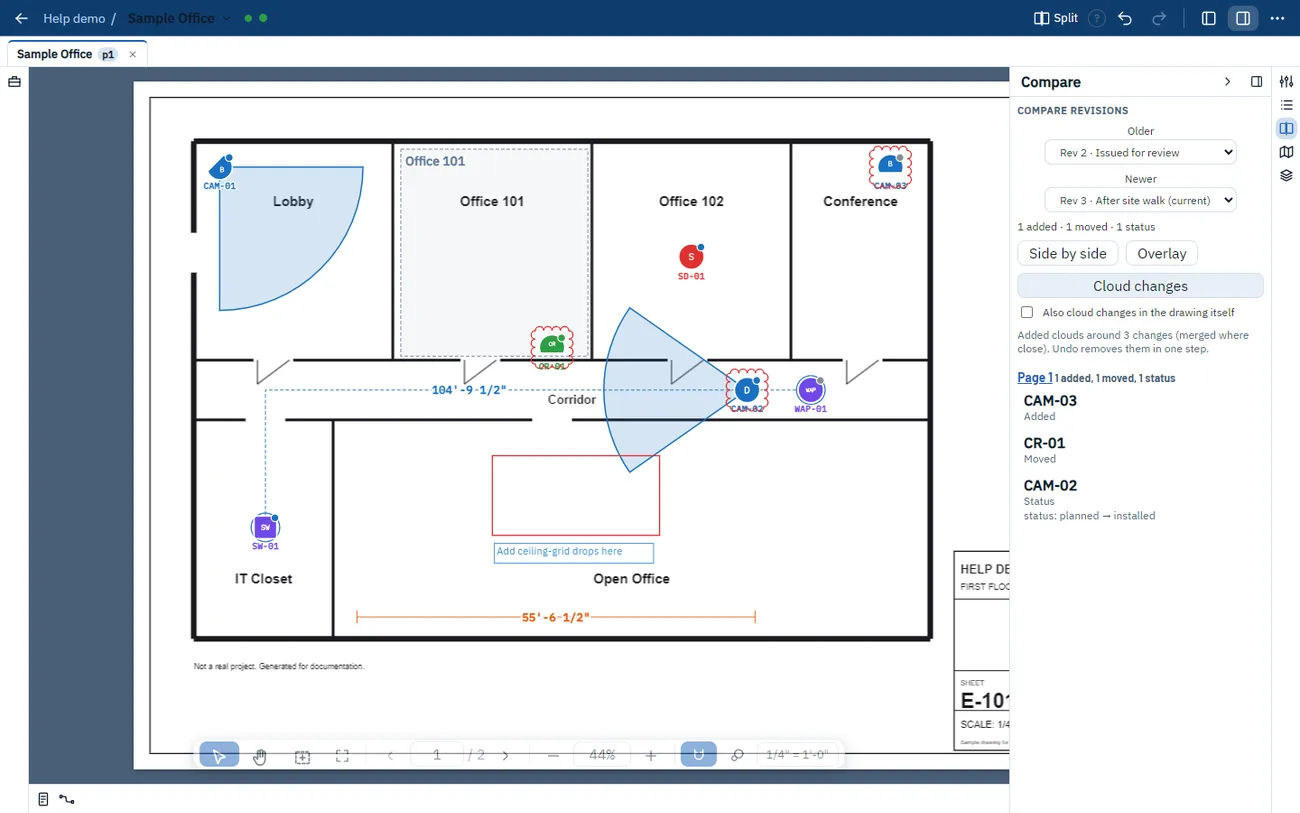
Every plan keeps its history. Pick any two revisions and PlanAsBuilt lists every change between them. One click draws revision clouds around all of them on their own layer, ready to issue.

  • Added, removed, moved and resized devices, plus field and status changes
  • Cloud changes: automatic revision clouds around every change, undone in one step
  • Optionally cloud changes in the drawing itself, not just your markups
  • Side by side and overlay views, and click any change to jump to it
  • Restore an older revision without losing anything
A plan with revision clouds drawn automatically around a new camera, a moved card reader and a camera whose status changed, next to the Compare panel listing those changes.

Outputs

From the field to the finished package.

Turn the marked-up plan into the documents your customer expects.

  • Parts list (BOM) with device counts and cable lengths
  • As-built report
  • Clean PDF exports with legends and a Prepared by stamp with your logo
  • Editable PDF exports that open in your PDF tools
The bill of materials page listing device counts and cable length.
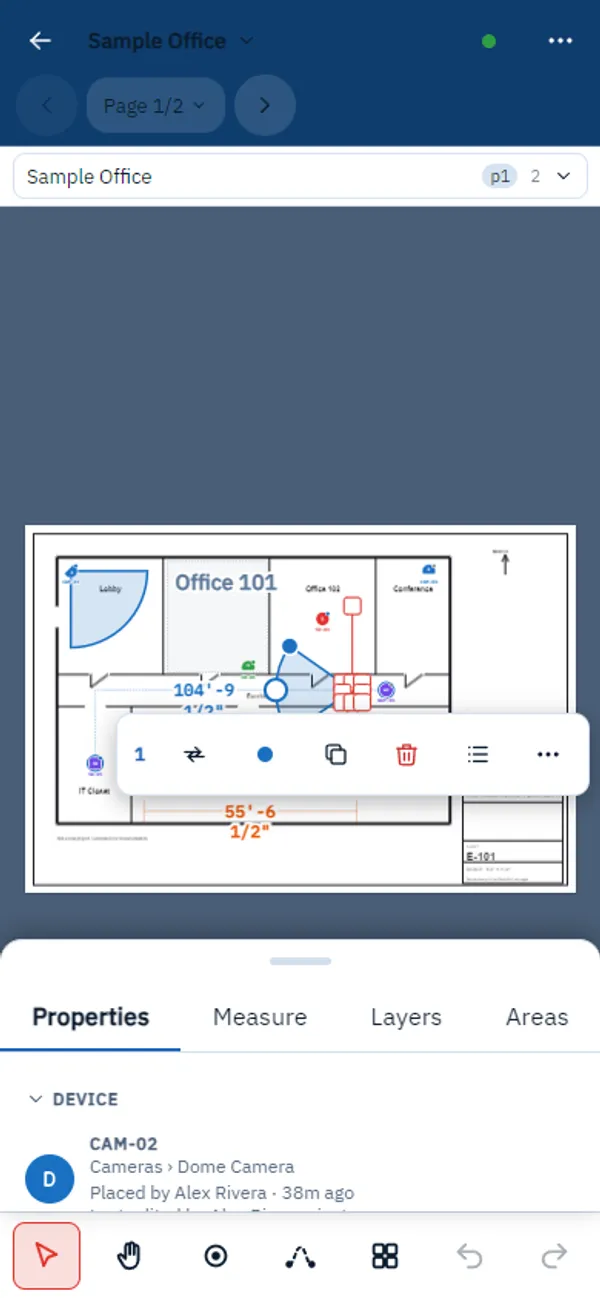
PlanAsBuilt on a phone: a floor plan with a selected camera, a quick action bar, a Properties sheet and a bottom tool row.

Mobile friendly

The whole job fits in your pocket.

Installers do not carry a desktop. PlanAsBuilt is made for phones and tablets, in the field and on the ladder.

  • The full app on phones and tabletsNothing is cut down. Mark up, edit and review on whatever you carry.
  • A layout built for one handOn a phone you get a tool row and bottom sheets for properties, layers and measuring. Tablets use the full layout.
  • Touch gestures that feel naturalPinch to zoom, drag to pan, press and hold for the context menu, double-tap to finish a run.
  • Scan barcodes and QR codesPoint the phone camera at a serial or MAC label and the value fills in.
  • Works offlineKeep working without signal. Changes sync when you reconnect.

More about mobile and field use

Roles and access

Give everyone the right access.

Office, field crews, subcontractors and your customers each get the access that fits their job.

Office

Admin

Everything, including members, project settings and deleting plans and layers.

Office

Editor

Draws and edits plans and devices.

Field

Field tech

Updates device fields, status, notes and photos. Cannot add, move, resize or delete markups.

Customer

Client

Read-only. Sees no costs and no fields marked internal.

  • Prices stay private. Roles without cost access never see prices, and the BOM tab shows as Parts.
  • Subcontractor scope. Choose exactly which symbol sets and layers a subcontractor can see.
  • Lock and archive. Lock a project so only admins can edit, or archive it to make it read-only. Admins can restore it any time.

See what each role can do

Everything in one place

Built for the way integrators work.

Device catalog

Drop symbols from your own catalog. Tags number themselves.

Status tracking

Planned, installed, tested, punch. See progress at a glance.

Snap and align

Snap to walls and to other devices so the plan stays tidy.

Coverage cones

Show what each camera sees, right on the plan.

Cable runs

Draw runs between devices. Lengths flow into the parts list.

Live teamwork

See teammates on the plan. Edits sync in real time.

Roles and access

Office, field, subs and customers each see what they should.

Mobile friendly

The full app on phones and tablets, with touch gestures and barcode scanning.

Works offline

No signal in the plant room? Keep working and sync later.

Parts list (BOM)

Device counts and cable lengths, ready to export.

Clean PDF output

Flattened or editable PDFs with legends and your stamp.

Explore all features

How it works

From plan to as-built in three steps.

  1. 1

    Upload your plans

    Add the construction PDFs for your project and invite your team.

  2. 2

    Mark up and install

    Place devices, draw runs, and update status as work gets done in the field.

  3. 3

    Export and deliver

    Generate the parts list, as-built report and a clean, stamped PDF.

FAQ

Questions, answered.

What is PlanAsBuilt?

A web app for marking up construction plan PDFs. You place device symbols, draw coverage and cable runs, track status, and produce a parts list and a clean as-built PDF.

Who is it for?

Security and low-voltage integrators: owners and project managers who plan and report, installers who work in the field, and the customers who receive the as-built documents.

Does it work on a phone or tablet?

Yes. It runs in the browser and adapts to touch screens. You can also install it as an app on your home screen.

Does it work without internet?

Yes, for plans you have opened or saved for offline use. Your changes wait on the device and send when you are back online.

Can several people work on the same plan?

Yes. You see teammates' cursors and selections, and changes show up for everyone as they happen.

Can I get my markups into other PDF tools?

Yes. You can export editable PDFs that open in your PDF tools, or flattened PDFs for sharing.

How much does it cost?

Free during early access. We will tell you well ahead of time before anything changes.

How do I get access?

Fill in the form on this page. We will reach out by email to get you started.

Early access

Get early access.

PlanAsBuilt is free during early access. Tell us a little about you and we will be in touch.

Ready to try it on your next job?

PlanAsBuilt is free during early access. Tell us about your team and we will get you set up.

Get early access